


WeMuslim: Athan, Qibla&Quran
4.11.52K Reviews
App Specs
- Version
- 3.5.0
- Updated On
- License
- Free
- Downloads
- 100,000,000+
- Developer
- Metaverse Technology FZ-LLC
- Categories
- Lifestyle
- Platform
- Android, iOS
Screenshots

 Analysis by AppCompare
I’ve found WeMuslim: Athan, Qibla&Quran most useful when I want everyday worship tools close at hand without switching between several apps. Its mix of prayer reminders, a Quran reader, direction finding and smaller devotional utilities gives it a clear purpose: making routine religious tasks easier to manage on a phone. That convenience is real, though I wouldn’t treat an all-in-one app as a substitute for checking local guidance or settling every question about practice.
A broad toolkit, with a clear trade-off
WeMuslim is a free lifestyle app from Metaverse Technology FZ-LLC. Its current version is 3.4.1, and it has grown to more than 100 million installs, with a 4.6 average from around 710,000 ratings. Those figures suggest a large audience, but what matters more in daily use is whether the features you need are easy to reach. Here, the appeal is having several familiar tools gathered in one place rather than building a routine around separate prayer-time, Quran and compass apps.
The trade-off is that a broad toolkit can feel busier than a single-purpose app. If you only need a prayer schedule, a dedicated prayer-time tool may offer a more focused experience. If your main priority is careful Quran study, you may prefer a specialist reader with the exact translations, commentary or study workflow you already trust. I’d choose WeMuslim when convenience across several needs matters more than having the deepest version of any one tool.
Making prayer reminders work in real life
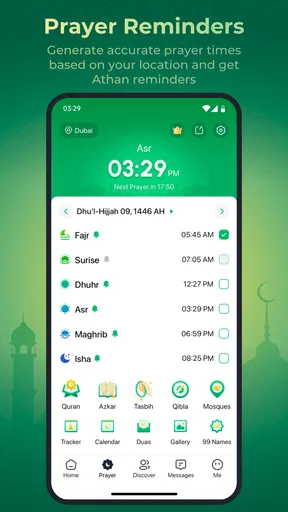
Prayer times are most useful when the schedule matches the place and method you rely on. Location-based adjustment can reduce manual work while travelling, but automatic location is not a guarantee that every calculation will match your local mosque or personal preference. I’d check the displayed times against a trusted local source when setting the app up, then revisit the location and calculation choices after a move or a trip. That small check is more dependable than assuming a phone has placed you exactly where you think it has.
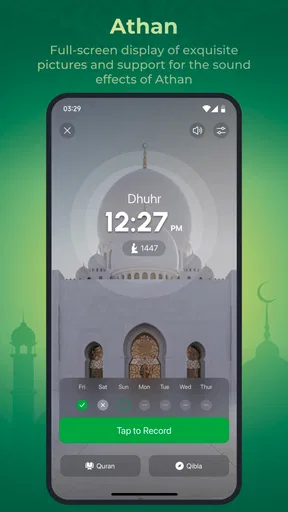
Notifications also need to fit the setting. A sound that works at home may be awkward in a quiet office, on public transport or during a meeting, so choosing vibration or a softer reminder can make the feature practical instead of disruptive. I’d allow a little time to test the alert before relying on it for a busy day. If a reminder seems late or early, first check the location and notification settings rather than assuming the schedule itself is wrong.
Reading and listening without losing your place
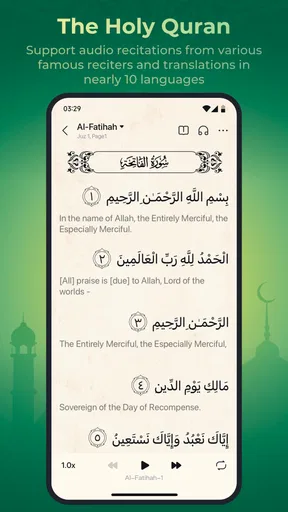
The Quran tools suit short, regular sessions as well as longer reading. Text-size and background options make it easier to adapt the page to your comfort, while bookmarks and notes give you a way to return to a passage or keep a personal reflection connected to it. A useful habit is to bookmark the stopping point before closing the reader; that is especially helpful when reading in brief gaps during a commute or between tasks.
Audio recitation makes the app useful when looking at a screen is inconvenient, such as while preparing for the day or taking a quiet break. Listening and reading are different experiences, though, and I would not assume that audio alone gives the context or translation a learner needs. If you are studying meanings in depth, use the reader as a convenient companion to the translation or teaching materials you already trust, rather than expecting a compact phone app to answer every interpretive question.
Worth Reading Before You Choose

Baby Panda World Brings Quick Play to Modern Phones, but Its Game Library Feels Busy

ESPN’s Live Game View Makes Following Close Games Easier

QuizzLand Review: A Good Fit for Short Trivia Breaks, Not Every Player

Basketball Stars: Multiplayer Is Fast, but Can It Recover When Matches Go Wrong?

WEBTOON Turns Phone Updates Into a Better Reading Routine

Link to Windows Runs on Shared Habits, Not Social Feeds
Small tools that support a routine
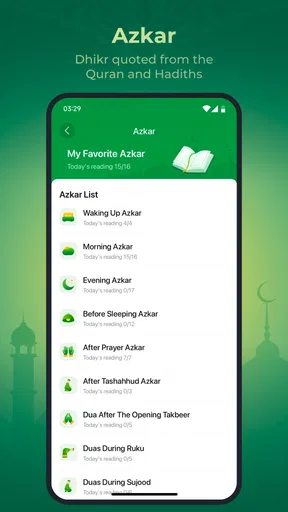
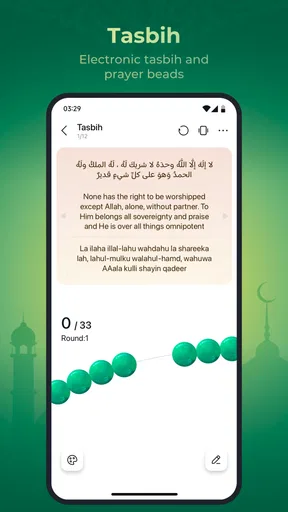
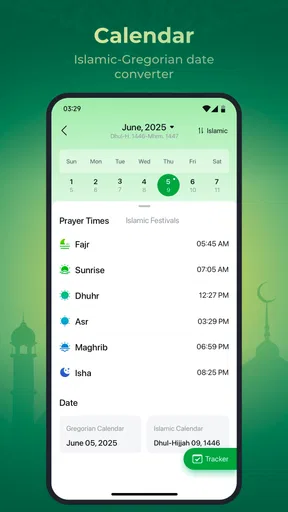
The Hijri calendar, event reminders, Duas and Tasbih counter add value when they help with a specific habit. For example, a person who tends to lose count during a short Dhikr session may appreciate having a counter ready, while someone planning around Islamic dates can use the calendar as a quick reference. These are modest tools, not a reason by themselves to install another app, but their presence can save a few separate searches when the main app is already part of your day.
One practical way to avoid clutter is to decide which tools you will actually use before turning on every reminder. Calendar alerts are helpful when they relate to dates you observe; too many notifications can become background noise and make the prayer reminders easier to ignore. I’d keep the app’s role simple: choose the alerts that support your routine, and leave the rest quiet until there is a reason to use them.
What version numbers can—and cannot—tell you
The release record begins on March 1, 2023, and the app has since reached version 3.4.1. That establishes that WeMuslim has continued through multiple versions, but a version number by itself does not explain which features changed or how a particular issue was handled. I wouldn’t infer a specific redesign, fix or new tool from the number alone. For someone deciding whether to install it, the current experience and the settings available on their own device matter more than assumptions about a version history.
For existing users, a sensible approach is to review the settings after an update if prayer alerts, location behaviour or reading preferences seem different. That is a general precaution, not a claim that this version changes those settings. Keeping the app current can be useful, but the more important check is whether your own schedule, permissions and chosen preferences still suit the way you use it.
Who will get the most from it
I’d recommend WeMuslim to someone who wants a convenient home for prayer-time reminders, Qibla direction, Quran reading and a few supporting devotional tools. It is especially practical for people who move between home, work and travel, provided they take a moment to verify the location-based schedule in each new setting. It can also work well for a new user who wants to explore common tools without installing a separate app for every task.
It is less compelling for someone who already has a trusted local prayer timetable and prefers not to depend on phone alerts, or for a reader who needs advanced study resources beyond a comfortable reading and listening experience. People who find advertising distracting should also weigh that annoyance against the convenience of the free app; optional purchases are available, with in-app items ranging from $0.29 to $179.99, so I’d review the purchase details carefully before paying for anything.
Everyday use: from a commute to a quiet moment
Picture a workday that starts at home and ends across town. Before leaving, I’d check that the app’s location and prayer schedule reflect where I am, then choose a reminder style that won’t interrupt other people. During a quiet break, I could open the Quran reader, adjust the text for comfortable viewing and bookmark the passage before returning to work. Later, if I’m unsure of the direction in an unfamiliar place, the Qibla compass offers a quick reference. The benefit is not that one app handles every detail perfectly; it is that these small transitions can happen without hunting through several unrelated tools.
There are limits to that convenience. A phone compass can be affected by the environment and may need calibration, so I would use it as a practical guide rather than treating a quick reading as infallible. In a new location, orienting yourself with care is worthwhile. Likewise, a prayer notification is a prompt, not proof that the schedule matches every local convention. These checks take little time and help prevent the app’s convenience from turning into misplaced confidence.
Privacy, setup and the first decision
Because location affects prayer times and direction, setup deserves attention. If you prefer not to use automatic location, see whether the available settings let you choose a location manually and consider whether that fits your needs. I would grant only the access needed for the features I plan to use, then check that notifications are enabled if I depend on prayer alerts. This is a practical setup habit, not a reason to assume the app handles personal information in any particular way.
The app is rated for Everyone, which describes its content suitability, not whether its devotional approach will suit every person or community. Prayer-time methods and preferred resources can vary, so users should compare the app’s options with the guidance they follow. It is free to install, while some in-app purchases are available; that means trying the basic experience need not require a purchase, but I’d still pay attention to any purchase prompt and decide whether an extra is genuinely useful.
A measured recommendation
My overall view is that this is a useful organizer for everyday Muslim practice, especially when the value lies in keeping several familiar tools together. The strongest reason to try it is convenience: reminders, reading, direction and simple devotional aids can all be reached from one app. The main reasons to hesitate are equally practical: location-based schedules need checking, notifications can become intrusive, and a general-purpose Quran reader may not replace specialist study resources.
WeMuslim is worth considering if you want a flexible starting point or a compact daily companion and are willing to verify the details that matter locally. If you already have a setup you trust, there is no need to switch just because this app combines more features. I’d install it for the tools I expect to use, keep the schedule and alerts intentional, and judge it by whether it makes my own routine calmer and easier to follow.
Features That Stand Out
Let’s kick things off by talking about what WeMuslim brings to the table. First off, it’s got everything you’d expect: prayer times, the Holy Quran, and a Qibla compass. But it doesn’t stop there. The app also includes a calendar for Islamic events, a collection of Duas, and even Tasbih counting. It’s like having an Islamic encyclopedia at your fingertips.
Prayer Times and Athan Notifications
The prayer time feature is incredibly detailed. It automatically adjusts based on your location, so you don’t have to worry about fiddling with settings every time you travel. The Athan notifications are customizable, allowing you to choose between different Athan sounds or even a simple vibration. It’s perfect for those moments when you need a gentle reminder without disrupting everyone around you.
Qibla Compass - Always Know Your Direction
The Qibla compass is another handy feature. It’s accurate and simple to use. Just open the app, and it points you in the right direction for prayer. No more guessing or trying to align yourself using the sun!
The Holy Quran - Read and Reflect
One of the standout features is the Quran reader. It’s beautifully designed, with options to adjust the text size and background color for easy reading. You can bookmark verses, add notes, and even listen to recitations from renowned Qaris. The audio quality is top-notch, making it a pleasure to listen and reflect on the meanings.
Additional Handy Tools
If that wasn’t enough, WeMuslim also includes a Hijri calendar, which is incredibly useful for keeping track of Islamic dates and events. The app sends reminders for important dates, so you’re always in the loop. And the Tasbih counter? It’s a simple, yet elegant tool for keeping track of your Dhikr, making it easier to remember and reflect on your faith throughout the day.
User Experience - A Smooth Journey
The user interface is clean and intuitive. Whether you’re tech-savvy or not, you’ll find it easy to navigate through the different features. The app is fast, with minimal load times, ensuring you can access what you need right when you need it. Plus, the design is pleasing to the eye, which makes using the app a joy rather than a chore.
A Few Things to Consider
Now, while the app is a powerhouse of features, it’s not without its minor hiccups. Some users have reported occasional glitches with the location services, which can affect prayer time accuracy. However, this seems to be a rare occurrence and is easily fixed by manually adjusting the location settings.
Another point to consider is the ads. While they’re not overly intrusive, they can pop up at inopportune moments. There is an option to remove them through a small in-app purchase, which might be worth it if you’re a regular user.
Final Thoughts
Overall, WeMuslim: Athan, Qibla&Quran is a comprehensive Islamic app that delivers on its promises. It’s perfect for anyone looking to enhance their spiritual routine with ease and convenience. Whether you’re a frequent traveler or someone who loves to dive deep into the Quran, this app has something for everyone. It’s not perfect, but it’s pretty close.
If you’re on the hunt for a reliable app that brings together all the essential Islamic tools in one place, I’d recommend giving WeMuslim a try. Just a tap away, it’s like having a personal assistant to guide you on your spiritual journey.
Pros
- User-friendly interface
- easy to navigate.
- Accurate prayer times for any location.
- Customizable notifications for prayers.
- Includes Qibla direction with compass feature.
- Comprehensive Quran with audio recitations.
Cons
- Requires internet for some features.
- Ads can be intrusive at times.
- Limited language options available.
- Occasional bugs in older devices.
- Premium features behind a paywall.
FAQs for WeMuslim: Athan, Qibla&Quran
What features does WeMuslim offer?
WeMuslim provides a comprehensive set of features including accurate prayer times, Qibla direction, and a digital Quran. Additionally, it offers daily Islamic reminders, a Hijri calendar, and the ability to track your prayers. The app is designed to support Muslims in their daily worship practices, enhancing their spiritual journey.
Is WeMuslim available for both Android and iOS?
Yes, WeMuslim is available for both Android and iOS devices. You can download it from the Google Play Store for Android users and the Apple App Store for iOS users. The app is designed to work seamlessly across both platforms, offering a consistent user experience.
How accurate are the prayer times in WeMuslim?
The app provides highly accurate prayer times based on your location. It uses advanced algorithms and data to ensure precision. Users can also customize settings according to their preferred calculation method and school of thought, ensuring it meets personal preferences for prayer schedules.
Does WeMuslim require an internet connection to function?
An internet connection is required for initial setup and updates, such as downloading new Quranic content or updating prayer times. However, once configured, many of the app's features, like viewing prayer times and reading the Quran, can be accessed offline, making it convenient for users on the go.
Are there any ads or in-app purchases in WeMuslim?
WeMuslim may contain ads to support free usage. However, users often have the option to upgrade to a premium version via in-app purchases to remove ads and unlock additional features. The premium version typically offers an ad-free experience and enhanced functionalities, enhancing user engagement.


